
10 Actionable Steps to a High-Converting Website Design
If you run a service-based business—whether you’re a psychotherapist, a boutique law firm, or a fitness company—your website has one primary job: convert a stranger into a paying client.
Yet, so many small business sites are cluttered, slow, and designed around what the business owner likes rather than what the customer actually needs. When a potential customer lands on your page, you have roughly 0.05 seconds to convince them they are in the right place before they hit the "back" button to find a competitor.
As a designer, I see the same costly missteps over and over. If you want your website to work for you, focus on these 10 non-negotiable design pillars.

1. Master the "3-Second Rule" Above the Fold
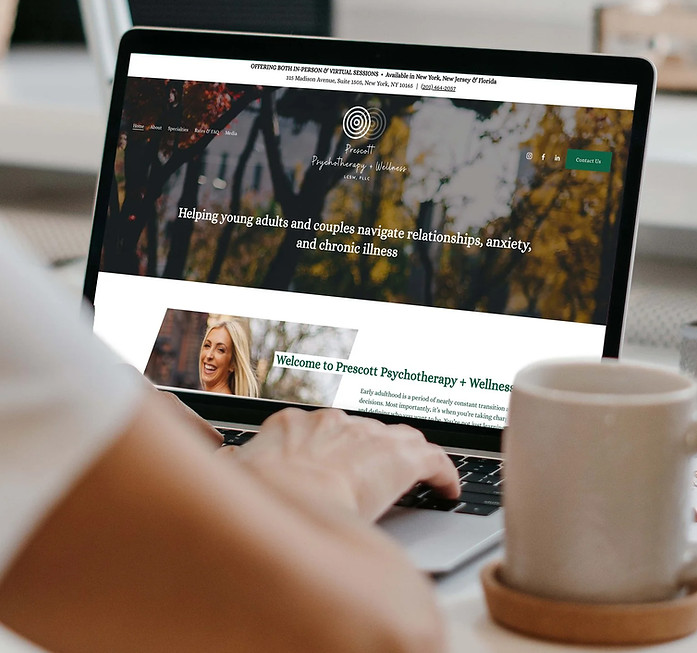
The area a user sees before they scroll an inch is your prime digital real estate. Within three seconds of the page loading, a visitor must be able to answer three questions: What do you do? Where do you do it? How do I buy it?
The Checklist: A) Replace abstract, poetic taglines with a clear H1 headline stating your service and location. B) Ensure your primary call-to-action button is visible without scrolling. C) Use a high-quality background image that instantly contextualizes your industry without being distracting.
2. Make Your Call-To-Action (CTA) Impossible to Miss
Don’t make people dig. If a user has to click through your "About" page or scroll halfway down your homepage just to find an email address, your design is failing you. Place a bold, high-contrast button in the top right corner of your navigation bar or dead-center above the fold.
Passive vs. Active CTAs
Avoid passive, low-stakes text that fails to drive action. Move away from generic phrasing and lean into high-intent actions:
What to Avoid:
Learn More. Use "Book a Consultation" instead.
Inquire. Use "Get a Free Quote" instead.
Submit. Use "Order Online" instead.
3. Color Discipline: The 60-30-10 Rule
Too many bright colors can cause visual fatigue. To give your website a polished, high-end feel that guides the user's eye naturally, stick to a tight three-color ecosystem using the interior design
60% Dominant Canvas (The Background): Usually a clean white, off-white, or deep charcoal. This creates the overall atmosphere and gives your content room to breathe.
30% Secondary Structure (Text and Elements): Your primary brand color, used for headers, sub-menus, and body text to establish strong visual structure.
10% Accent Pop (The CTAs): A vibrant, high-contrast color reserved exclusively for your action buttons. If your accent color is used anywhere else on the page, it loses its power to draw the eye.
4. Pass the Typography "Squint Test"
Typography isn't just about picking a font you like; it’s about creating an effortless reading experience. For local business sites, you need an undeniable visual hierarchy. Pair a bold, personality-driven header font (like an elegant serif or a heavy geometric sans-serif) with a highly readable, clean, neutral sans-serif for your body paragraphs.
The Squint Test:
Open your homepage, lean back, and squint your eyes until the screen blurs. Can you still instantly tell the headers apart from the paragraphs? If it all blobs together into a gray wall of text, you need to increase your header size, contrast, or weight.
5. Build for the Mobile "Thumb Zone"
Over 50% of local searches happen on a smartphone. Your mobile site shouldn't just be a shrunken, clunky desktop layout; it must be intentionally thumb-friendly.
Tap-to-Call: Make your phone number a prominent, clickable link so users can call you with one tap.
Sizing Safety: Ensure all buttons are at least 48x48 pixels so users don't accidentally click the wrong link with their thumb.

6. Trade Cheesy Stock Photos for Real Faces
A generic photo of three models in pristine hardhats smiling at a pristine blueprint does not build consumer trust. In fact, it triggers immediate skepticism.
Local businesses win on community connection, familiarity, and human trust. Show real, professional photos of yourself, your team, your wrapped trucks, your physical storefront, or your actual hands-on work. If you must use stock photography, pull from curated, authentic lifestyle platforms rather than old-school corporate graphics databases.
7. Strategic Social Proof (No "Reviews" Pages Allowed)
Don’t isolate your customer testimonials to a standalone "Reviews" page. Instead, scatter your positive reviews contextually across your entire homepage.
Pro-Tip: Embed a live Google Reviews widget, if you're a customer-facing business. Showing live, unedited feedback tied to real Google profiles dramatically raises your credibility and signals authenticity to prospective clients.

8. Aggressively Optimize Images for Speed
A beautiful website is completely useless if it takes four seconds to load. Large, uncompressed images straight from a modern camera or smartphone will completely tank your site speed—and Google actively penalizes slow sites in local search rankings.
Before any image is uploaded to your site, run it through a modern compression tool to shrink the file size while preserving visual clarity. Aim to keep every web image under 1MB (and ideally under 500KB for standard graphics). Speed is a design feature.
9. Create a Dedicated Architecture for Services
If you offer multiple distinct services (for example, an HVAC company offering AC repair, furnace installation, and indoor air quality checks), do not clump them all into one giant bulleted list on your homepage.
Give each primary service its own dedicated sub-page.
The Design Benefit: It keeps your homepage clean, uncluttered, and focused on your primary call-to-action.
The SEO Benefit: It gives Google a clean, dedicated URL to index, making it significantly easier for your business to rank when someone types a hyper-specific phrase like "furnace installation near me" into a search engine.
10. Maximize Your Footer Utility
When users get lost or want structural data, they instinctively scroll straight to the bottom of the page. Your footer shouldn't be treated as a dumping ground; it should act as your site's anchor.
Plus, if you have a physical location, every local business footer should clearly display your NAP Data (Name, Address, Phone Number). Keeping your NAP data identical across your footer, your contact page, and your Google Business Profile is an incredibly powerful signal to search engines that your business is legitimate, active, and local.
Take the Hassle Out of Web Design
Building a website that looks elevated and converts local traffic doesn't have to feel like guesswork. If you're ready to audit your current site or start fresh with a custom, high-end brand identity that does the selling for you, let's chat.
Explore our Website Design services → marqueedesignstudio.com/website-design
Snag our free design toolkits, font resources, and asset libraries → marqueedesignstudio.com/resources


Comments